Key Features
Overview
Mixer synchronizes in real time the modifications done to the scene and the objects it contains. During a collaboration session, Mixer displays the position of other participants and highlights their selections.
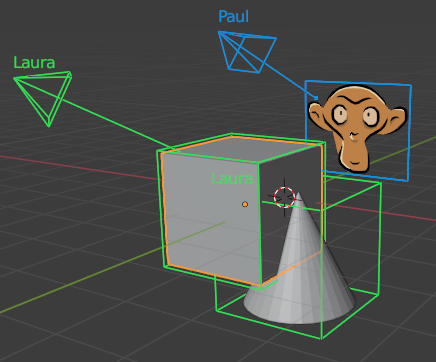
See Work together for more details.
What is synchronized
This table described the status of synchronization for the main Blender data types. The custom properties of all datablocks are also synchronized
Data |
Status |
Comments |
|---|---|---|
Action |
Yes |
See [Delay] |
Armature |
No |
|
Brush |
No |
|
Collection |
Partial |
Except collection children ordering |
Camera |
Yes |
|
Curve |
Partial |
|
Grease pencil |
Yes |
See [GreasePencil], [Edit], [Convert] |
Image |
Partial |
|
Keying sets |
No |
|
Library |
Partial |
See [Library] |
Light |
Yes |
|
Light probe |
No |
|
Line style |
No |
|
Mask |
No |
|
Material |
Partial |
see [Nodes] |
Mesh |
Partial |
except split normals, custom properties, see [Edit] |
Metaball |
Yes |
|
Movie clip |
Yes |
See [Media] |
Node group |
Yes |
Not extensively tested, see [Nodes] |
Object |
Partial |
Except motion paths, particles and physics. See [Convert] |
Paint curve |
No |
|
Particles |
No |
|
Shape key |
Yes |
|
Scene |
Yes |
See [Delay] |
Sound |
Yes |
See [Media] |
Text |
No |
|
Texture |
Yes |
|
Volume |
No |
|
VSE |
Partial |
Except meta strips. Not extensively tested |
Workspace |
No |
|
World |
Yes |
- Delay(1,2)
Some updates may be delayed until another modification is detected:
scene annotations: try to click around in the background of the 3D viewport
animation curves names : try to toggle the curve Enable checkbox twice.
- Edit(1,2,3,4)
While an object is not in Object mode (in Edit, Sculpt, Paint, …) the local modifications to this object are not sent to the other participants and the other participants modifications are not applied. Pending modifications are applied when the mode changes.
- GreasePencil
the mask layer is not correctly synchronized
area fill is sometimes not correct
- Image
Generated images and UDIMs are not synchronized. Image files are synchronized.
- Library
Nested libraries will fail when shared folders are not in use. The following are not synchronized:
the results of make local and reload
library overrides
- Media(1,2,3)
Media files are synchronized. The result of reload or media path modification are not synchronized.
- Nodes(1,2)
Links synchronization sometimes fails. Some cases might cause crashes.
Caveats
In addition to the limitations listed in the previous section, you should be aware of the following :
using undo may cause unexpected behavior and cause crashes. Using undo while in Object mode may undo other participants changes.
the files saved by all participants are not exactly identical.